Silence "Refreshing state…" & Highlight Changes in GitHub Actions Terraform Plan Output

This article was originally published in November 2022 on my GitHub io blog here
Purpose
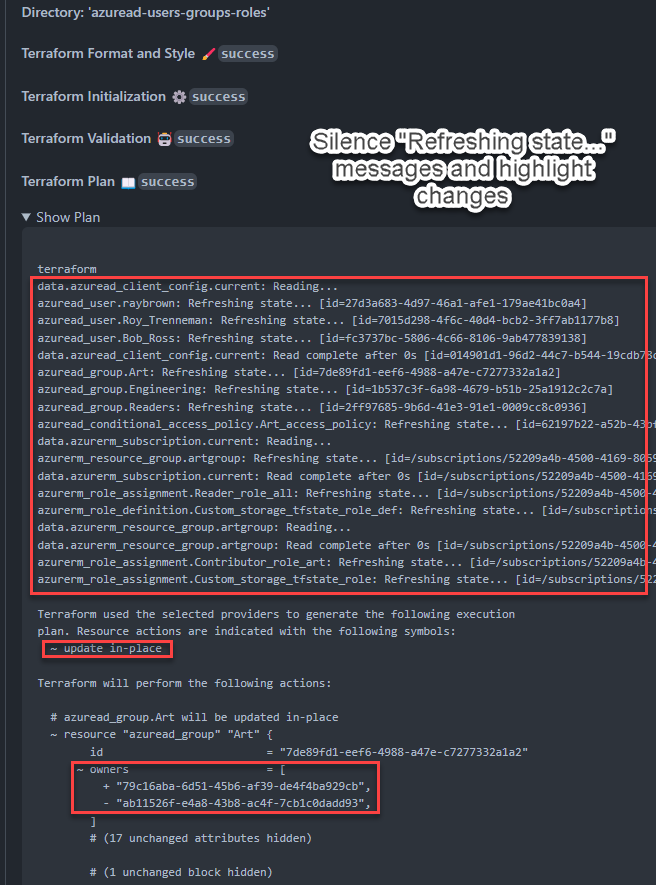
After working with GitHub Actions as my Terraform CI pipeline over the past year, I started looking for potential methods to clean up the Plan outputs displayed in PR comments to provide a more streamlined PR review. I was interested in finding a way to redact the "Refreshing state…" messages as I find them distracting and unnecessary for reviewing. These messages can also get quite lengthy for larger infrastructures containing many resources managed by Terraform. Essentially what Terraform is doing when generating these messages is ensuring that your state files are in alignment with the existing infrastructure.
I also found that you can incorporate the diff utility into your Actions pull-request script section to provide color highlights in the plan output. This runbook will cover both the lines of code needed for the diff utility to display results correctly and a method for silencing "Refreshing state…" messages.
I'll only be discussing the GH Actions jobs for Terraform plan, show, reformatting the plan, creating the plan environment variable and incorporating this into the script section of the pull-request plan output.
Code Samples
Example code snippets will be taken from my workflow on Github here
The PR I used for testing the config can be reviewed here
GitHub Actions Config
In the Terraform Plan job ensure that the
-no-colorflag is set as without it the output is not rendered correctly by the JavaScript and you'll see garbled text/characters. Apply the-outflag which saves the plan output to a local file and assign it a name:- name: "Terraform Plan" id: plan run: terraform plan -detailed-exitcode -no-color -out=plan -input=false continue-on-error: trueCreate a job for the Terraform Show output. This is going to read the local file of the plan saved in the previous step. Running this job is what will redact all of the "Refreshing state…" messages which get generated by the original terraform plan. Set an if condition to only run the show job when the plan has succeeded or provided exit codes 0 (no changes) or 2 (changes present) and write the contents to a text file:
      - name: Terraform Show
        id: show
        if: steps.plan.outcome == 'success' || steps.plan.outputs.exitcode == '0' || steps.plan.outputs.exitcode == '2'
        run: terraform show -no-color plan > plan.txt
        continue-on-error: true
Create a job to Reformat the plan contents of the text file and write it to a newly formatted text file. This will render the plan output in a way that the
diffutility recognizes changes within the file as its read during the pull-request script workflow. Thesedcommand in the job uses a Regex statement to apply spaces in front of any symbols next to resource actions by pushing them to the first column of the output. This is required for thediffutility to correctly render the output into color highlights for changes.- name: Reformat Plan run: | cat plan.txt | sed -E 's/^([[:space:]]+)([-+~])/\2\1/g' > format_plan.txt continue-on-error: trueCreate a job to assign the new formatted plan output to a Github Environment variable to call the var from within the pull-request script. Note the line containing
"${PLAN:0:65536}"is required for very large plan output as the GitHub database sets a limit of 65536 characters on comments. Without setting this limit, if you were to submit a PR over the limit the pipeline would fail. However, with this setting applied a very large plan would be truncated. In a truncated scenario, the reviewer can navigate to the Actions tab of the repo and analyze the full Terraform Plan job contents of the workflow.- name: Put Plan in Env Var run: | PLAN=$(cat format_plan.txt) echo "PLAN<<EOF" >> $GITHUB_ENV echo "${PLAN:0:65536}" >> $GITHUB_ENV echo "EOF" >> $GITHUB_ENVUpdate the pull-request script with the
diffutility and the new Plan environment variable:<details><summary>Show Plan</summary> \`\`\`\diff\n ${{ env.PLAN }} \`\`\` </details>
Conclusion
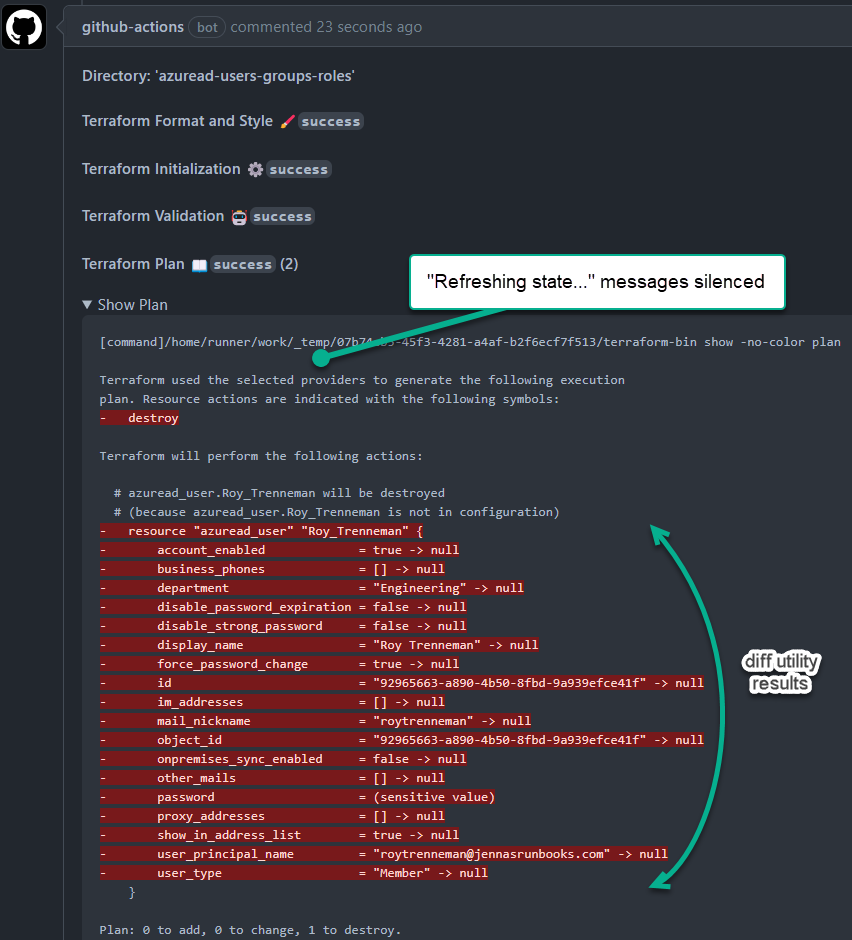
With the Terraform jobs described above in place, the CI pipeline for the PR comments will no longer display the "Refreshing state…" messages and color highlights will be generated for all changes (ie lines with -+~ symbols) to plan output. This provides for an overall cleaner PR comment for the reviewer as seen in this example:
About the author
- Hi there! I'm a Cloud Engineer & SRE, documenting my transition into AI/ML Platform Engineering. I write technical deep-dives, hands-on implementation guides, CLI helper scripts, and visual architectures covering cloud, infrastructure, orchestration, governance, and modern AI runtimes.
Comments
Join the discussionFor the very large plan problem you can split the output into chunks (max size) then loop over the chunks making one comment per chunk
Great tip, Diego Diaz Espinoza, thank you for sharing!
MLOps & Reliability
The automated workflows, observability, reliability engineering, and cost controls required to ship, monitor, and scale production systems sustainably. Covers IaC (Terraform), event-driven automations (Lambda, SES), CI/CD (GitHub Actions), FinOps, and more.